



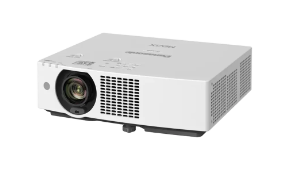
Panasonic PT-VMQ65T
雷射投影機
-1.6倍縮放鏡頭
-高效環保設計
產品基本資訊
品牌:Panasonic(松下國際)
型號/名稱: PT-VMQ65T
| 型號 | PT-VMQ65T |
| 投影機類型 | LCD 投影機 |
| LCD 面板 | |
| 面板尺寸 | 0.64 吋 (16:10 aspect ratio) |
| 顯示方式 | LCD 面板 (x 3, R/G/B) |
| 像素 | 2,304,000 (1920 x 1200) 像素 x 3 |
| 光源 | 雷射二極體 |
| 光源輸出1 | 6,500 lm2 / 6,500 lm (ANSI)3 / 6,800 lm (Center)*4 |
| 光源輸出衰退至50%時間*5 | 20,000 小時(正常模式/靜音模式), 24,000 小時(ECO) |
| 解析度 | 4K (3840 × 2400 像素)*6 |
| 對比度*2 | 5,000,000:1 (全開/全關) (當 [影像模式] 設定為 [動態] 且 [動態對比] 設定為[1]時 ) |
| 螢幕尺寸 (對角線) | 0.76–7.62 m (30–300 吋), 長寬比為 16:10 |
| 中心邊角區域比*2 | 85 % |
| 鏡頭 | 1.6x 手動變焦(投射比: 1.09–1.77:1), 手動變焦鏡頭, F=1.58–1.91, f=15.30–24.60 mm |
| 數位變焦擴展功能*7 | 投射比 1.09–2.21:18 (對應值,與光學變焦搭配使用時) |
| 鏡頭位移 (以鏡頭安裝原點 為基準) | |
| 垂直 | +44 % |
| 水平 | ±20 % |
| 梯形校正範圍 | 垂直 ±25°, 水平 ±35° |
| 安裝方式 | 天花板/地面, 正面/背面, 360˚自由安裝 |
| 端子 | |
| HDMI™ 1/2 輸入 | HDMI™ 19-pin x 2 (支援 HDCP, Deep Color, 4K/60p 訊號輸入), 支援CEC9 |
| HDMI™ 輸出 | HDMI™ 19-pin x 1 (支援 HDCP, Deep Color, 4K/60p 訊號輸出) |
| 聲音輸入 | M3 立體聲迷你插孔 x 1 |
| 聲音輸出 | M3 立體聲迷你插孔 x 1 |
| 序列輸入 | D-sub 9-pin (母座) x 1 用於外部控制 (符合RS-232C) |
| DIGITAL LINK/LAN | RJ-45 x 1 用於網路控制與DIGITAL LINK連接 (影像/網路/序列控制) (相容 HDBaseT™), 支援 100Base-TX (支援 PJLink™ [Class 2], HDCP, Deep Color, 4K/60p10 訊號輸入) |
| LAN | RJ-45 x 1 用於網路控制, 支援 10Base-T, 100Base-TX, 相容 PJLink™ [Class 2] |
| USB (影像播放/無線模組/DC電源輸出) | USB (Type A) x 1 可支援Memory Viewer功能, 選購 AJ-WM50 系列無線模組, 以及電源供應 (DC 5 V, 最大 2 A11) |
| 協議版本 | IPv4, IPv6*12 |
| 電源規格 | 單項交流電 AC 100–240 V, 50/60 Hz |
| 最大功耗 | 335 W (3.4–1.5 A) (340 VA) (電壓 200–240 V 時為 320 W) (TBD) |
| 運作模式耗電量 (省電模式)1 | |
| [正常模式] | 290 W (100–240 V), 280 W (200–240 V) (TBD) |
| [節能模式] | 225 W (100–240 V), 215 W (200–240 V) (TBD) |
| [靜音模式 1] | 255 W (100–240 V), 245 W (200–240 V) (TBD) |
| [靜音模式 2] | 220 W (100–240 V), 210 W (200–240 V) (TBD) |
| 機殼材質 | 強化塑膠 |
| 濾網*15 | 內附 (長效濾網更換時間:約 20,000 小時) |
| 工作噪音*2 | 35 dB (正常模式/節能模式), 30 dB (靜音模式 1), 25 dB (靜音模式 2) (TBD) |
| 尺寸 (W x H x D) | 399 × 115 × 348 mm (不含突起部位) (TBD) 399 × 133 × 348 mm (含腳架最低高度) (TBD) |
| 重量*16 | 約 7.1 kg (TBD) |
| 運作環境 | 操作溫度: 0–45 °C *17, *18, 操作濕度: 20–80 % (無冷凝) |
| 應用軟體 | Multi Monitoring & Control Software (多台設備監控管理軟體) , Presenter Light Software (適用於 Windows®19) , Wireless Projector App (適用於 iOS/Android™20) |
1. 於影像模式設為 [動態] 且光源功率設為 [標準] 時測得。
2. 測量方式、測量條件及標示方法皆符合 ISO/IEC 21118: 2020 國際標準。數值為出貨時之平均值。
3. 測量方式、測量條件及標示方法皆符合 ANSI(美國國家標準協會) 標準。數值為出貨時之平均值。
4. 於 [標準] 模式下,測得所有出貨產品之螢幕中心點平均亮度值。
5. 約在此時間點,光輸出亮度將降至原始約 50%(影像模式:[動態],動態對比度設為 [2])。光源壽命至 50% 之估計時間會因使用環境而異。
6. 當雙軸像素位移技術 (2-axis pixel-shifting) 開啟時之顯示解析度(3840 x 2400 像素)。
7. 使用 數位變焦擴展功能 (Digital Zoom Extender) 時解析度會降低。使用此功能時,無法使用格狀調整、6 點螢幕校正、垂直/水平梯形校正及曲面校正,且邊角調整範圍會受限。
8. 當數位變焦擴展功能設為 80% 時。
9. 連動控制功能可能因所連接之 CEC 指令相容設備而無法正常運作。
10. 經由 DIGITAL LINK 輸入 4K/60p 訊號時,僅支援 YPBPR 4:2:0 格式。
11. 在待機模式下,若 [快速啟動] 設為開啟或 [電源管理] 設為就緒,即可供電。
12. 選配之 AJ-WM50 系列無線模組不支援 IPv6。
13. 測量方式、測量條件及標示方法皆符合 ISO/IEC 21118: 2020 國際標準。
14. 運作模式下的功耗測量條件:操作溫度 25 °C (77 °F)、海拔高度 700 公尺 (2,297 英呎)。
15. 濾網清潔週期因使用環境而異。濾網可清洗並重複使用最多兩次。清潔週期:20,000 小時(粉塵濃度 0.08 mg/m³ 時)、10,000 小時(粉塵濃度 0.15 mg/m³ 時)。
16. 此為平均值,實際機型可能有所差異。
17. 若操作溫度高於 30 °C (86 °F),光輸出亮度會受限;且投影機無法在海拔超過 2,700 公尺 (8,858 英呎) 的高度運作。
18. 安裝選配的 AJ-WM50 系列無線模組時,操作溫度範圍將變更為 0–40 °C (32–104 °F)。
19. 使用 Presenter Light 軟體時,影像會以 1280 x 800 或 1024 x 768 點陣投影。傳輸影音時,電腦解析度可能會被強制變更,且音訊播放可能會中斷或產生雜訊。
20. 使用 Wireless Projector 應用程式時,顯示解析度因 iOS/Android™ 設備及顯示裝置而異。最高支援解析度為 WXGA (1280 x 800)。.
常見問題
聯絡我們Contact Us
如任何產品相關需求,歡迎您與我們聯絡(服務時間:平日9:00~18:00):
注意事項
請務必填寫有星號(*) 標示之欄位,送出後我們將三分鐘內與您聯繫
※ 客服服務時間 : 週一至週五 9:00~18:00
晟弘科技有限公司-LINE官方帳號
行動條碼

※如何加入好友?
方法(一) 開啟LINE主選單>加入好友>行動條碼 掃描左圖即可加入好友
方法(二) 點擊左方 Add Friends按鈕 即可加入好友
方法(三) 搜尋LINE ID:「@tya3953z」
有任何投影機、投影布幕或其他產品相關需求都歡迎透過LINE詢問。
我們會不定期分享產品相關訊息或優惠活動資訊,歡迎您將晟弘科技加為好友,隨時掌握我們的最新動態! : )