



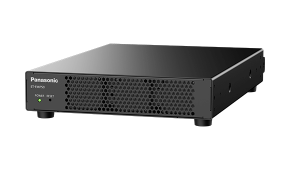
產品基本資訊
品牌:Panasonic(松下國際)
型號/名稱: ET-FMP20
| Model | ET-FMP20 |
| Type | Box-type |
| Terminals | |
| LAN | RJ-45 x 1 for network connection, 10Base-T/100Base-TX, 1000Base-T, NDI® and DanteLAN ® (2 channels)*1 compatible |
| HDMI™ OUT 1/2/3/4 | HDMI™ x 4, Audio signal: Linear PCM, 44.1 kHz/48 kHz, 16-bit, 2 channels |
| Audio OUT | 3.5 mm stereo mini-jack |
| NDI®-compatible streaming content | Image compression method: High Bandwidth NDI®; Image resolution/frame rate: 3840 x 2160/60p, 3840 x 2160/50p, 1920 x 1080/60p, 1920 x 1080/50p; Audio signals: Linear PCM, 44.1 kHz/48 kHz, 16-bit, 2 channels |
| Max. video output resolution | 3840 x 2160/60p x 1 or 1920 x 1080/60p x 4*2 |
| Video format | H.264, 8-bit, 3840 x 2160 pixels, 60p, YPBPR 4:2:0, 300 Mbps / H.265, 8-bit, 18 million pixels (long side 7680 pixels or less), 60p, (including 7680 x 1920/60p, 4096 x 4096/60p), YPBPR 4:2:0, 300 Mbps |
| Audio format | AAC-LC, 16-bit, stereo |
| Storage | 512 GB*4 |
| Operating system | Linux |
| Power supply | Single-phase AC 100–240 V, 50/60 Hz |
| Maximum power consumption | 64 W |
| Operation noise | 42 dB (Max), 33 dB (Normal) |
| Dimensions (W x H x D) | Approx. 210 mm x 44 mm x 295 mm (8 9/32˝ x 1 23/32˝ x 11 5/8˝ ) (Excluding feet) |
| Weight | Approx. 2.0 kg (4.41 lbs) (Excluding AC adapter and cord) |
| Operating environment | Operating temperature: 0–40 °C (32–104 °F), operating humidity: 10–80 % (no condensation) |
*1 HAP Q content is not supported.
*2 When four HDMI™ outputs are used simultaneously.
*3 Compatible with HAP 1 and HAP Q. Please consult the spec file for detailed information.
*4 For the ET-FMP20 (512 GB) and ET-SBFMP10 (512 GB),approximately 30 GB of the total storage space is allocated for system usage and is unavailable to the user.
*5 The operating temperature range may differ according to the specific projector model paired with the ET-SBFMP10.
聯絡我們Contact Us
如任何產品相關需求,歡迎您與我們聯絡(服務時間:平日9:00~18:00):
注意事項
請務必填寫有星號(*) 標示之欄位,送出後我們將三分鐘內與您聯繫
※ 客服服務時間 : 週一至週五 9:00~18:00
晟弘科技有限公司-LINE官方帳號
行動條碼

※如何加入好友?
方法(一) 開啟LINE主選單>加入好友>行動條碼 掃描左圖即可加入好友
方法(二) 點擊左方 Add Friends按鈕 即可加入好友
方法(三) 搜尋LINE ID:「@tya3953z」
有任何投影機、投影布幕或其他產品相關需求都歡迎透過LINE詢問。
我們會不定期分享產品相關訊息或優惠活動資訊,歡迎您將晟弘科技加為好友,隨時掌握我們的最新動態! : )